3CX Reporting
3CX Reporting
- Sign into https://schompautomotive.co.3cx.us:5001/#/login
- Once signed in, on the left hand side you will see "Reporting". Click on this, and you will then see "Reports"-click on this.
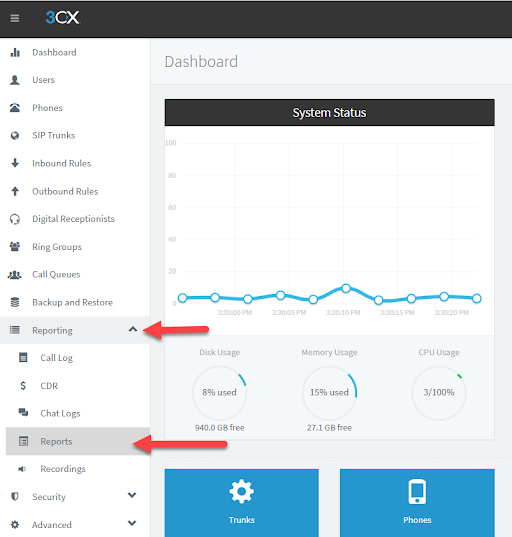
- You will then be brought to the Reports section. To run a report click "Add"
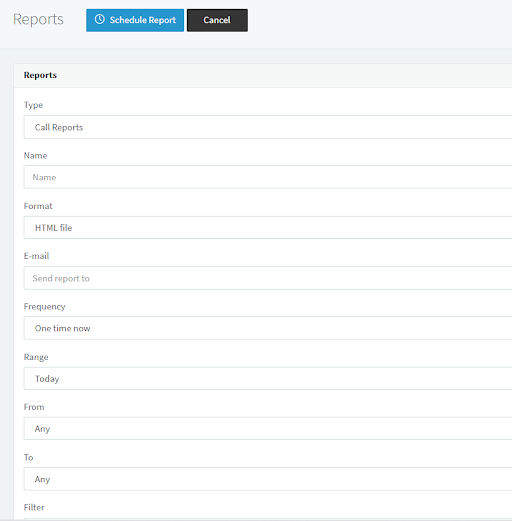
- Here, you will need to specify the type of report you wish to run, there are many different types of reports that can be generated that will show different statistics and data. You will need to enter a name for the report in the "Name" field for example "Missed Queue Calls". Then you will need to enter your schomp email address in the "E-Mail" field as 3CX will compile the data and send an email with a link to view the report to the email provided.
- If you are unsure of what report you are needing, a helpful FAQ link from 3CX can be found here: https://www.3cx.com/docs/manual/call-reports/
This link provides explanations of the different types of reports you can pull as well as other helpful tips!