How to Sync Newly Updated PC Login/WD password on Macbooks
How to Sync Newly Updated PC Login/WD password on Macbooks
Alert: Alert! This is for when you create a new PC login/WorkDay login password. Do NOT forget your old password as it will be needed briefly in this process.
1. Click here- the 3 lines at the top of screen
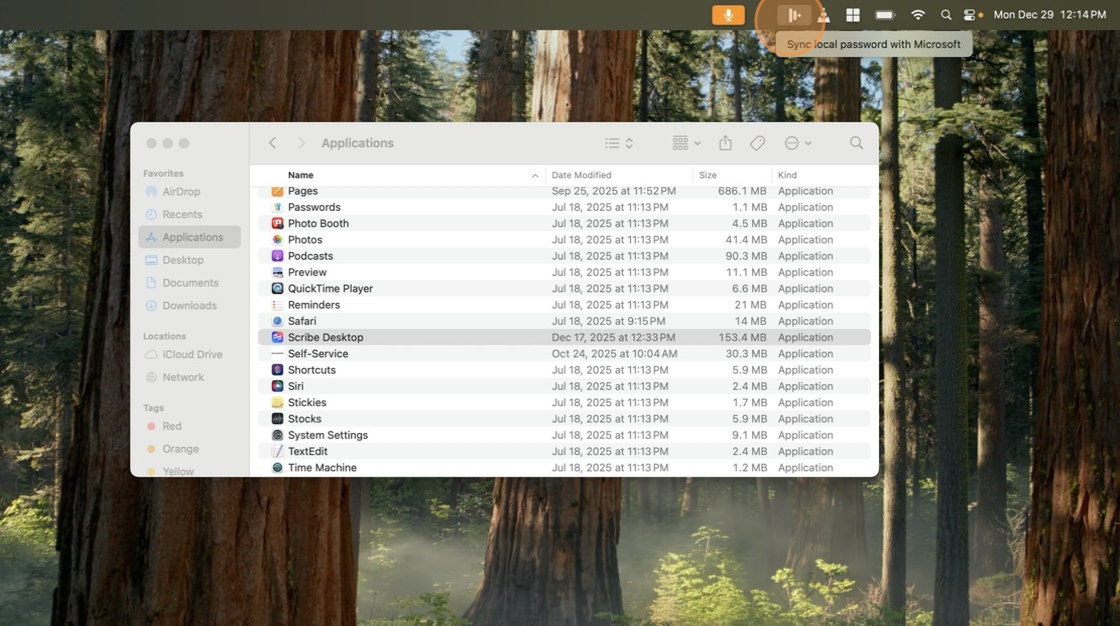
2. Click "Sync local password with Microsoft"

3. A new screen will pop-up. Click in the password field box and enter your current PC login/WorkDay password.

4. Click "Sign in" once password has been entered

5. Click "Yes"

6. A new screen will pop-up. Click in the text box and enter your old PC login/WorkDay password (This will be the password you used to sign into your Macbook BEFORE you just changed it)

7. Once you've entered your old password, press "Enter"

Tip: If done correctly this screen will disappear and you should then be able to lock your Macbook and sign in using your newly created PC login password.
Related Articles
Step by Step Guide On Resetting Workday Login Password and Synching that to Macbook Keychain
Navigate to activedirectory.schomp.com and sign in using your Macbook login password as the password and FirstName.LastName as username. If you're prompted to make a new password, go ahead and do so- that means your password has expired. If that ...First time Login - Windows
1. Login Screen First you will be prompted with a screen that appears similar to the one below 2. Select "Other User" Next you will need to select the Other User button on the bottom left of the screen highlighted in red 3. Enter your credentials You ...3CX WebClient Login
Get started: Logging on 1- Open your “Welcome to 3CX | Your Account Details” email. 2- If your admin has enabled SSO for Google Or Microsoft, sign in with those credentials. 3- If not, click on the “Set your Password” link specified in your email and ...3CX Deskphone login
Logging In To log into a hot desking device the user dials *77*[Extension Number]* (e.g. *77*100*). An automated system answers and prompts the user to enter their voice mailbox PIN number. Upon completion a confirmation prompt is played and the ...Webclient Queue login
Global LogIn and Logout The global queue toggle will add an agent to all queues in operative mode or remove them from service. However, it will NOT override explicit queue logouts. 3CX Web Client You can easily “Login to queue” or “Logout from queue” ...