3CX Guide: How to Set-Up Forwarding rules for 3CX Statuses
3CX Guide: How to Set-Up Forwarding rules for 3CX Statuses
1. Navigate to https://schompautomotive.co.3cx.us:5001/#/people

2. In the top right corner will be your Initials-Click here

3. A drop-down menu will appear. Click "Settings"

4. You'll be brought to a new page. Click "Call Forwarding"

5. Here you'll see the different statuses you can set yourself to in 3CX. The steps will be the same for adjusting call routing for any 3CX status you choose. We will be adjusting what happens when a call comes into your 3CX DID when you're set to "Away" in 3CX.
Click "Away"

6. A new screen will populate.
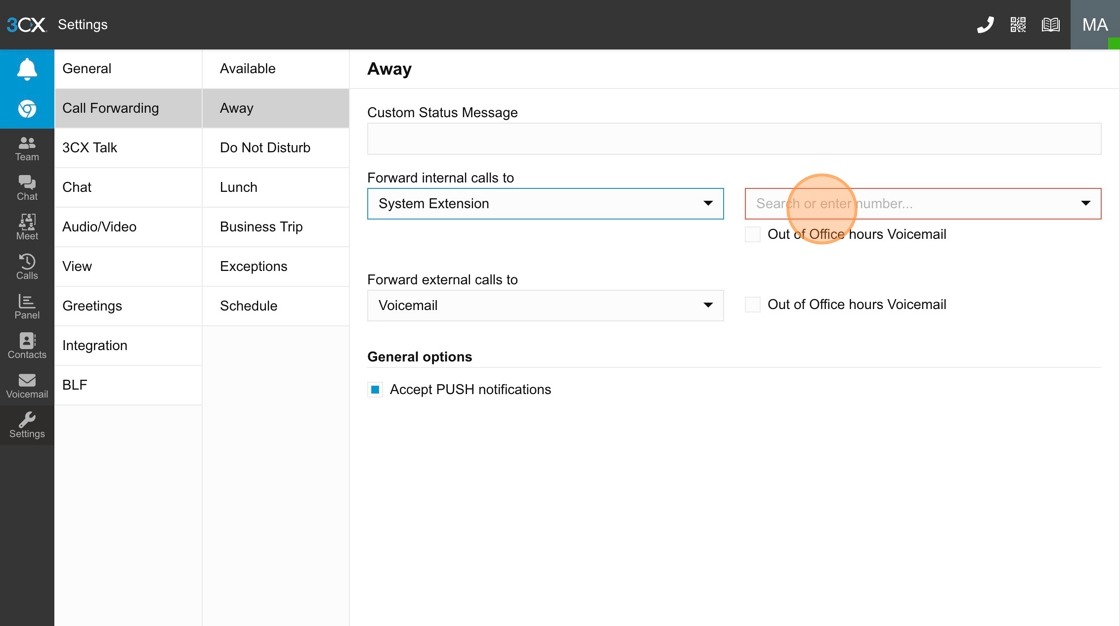
You'll see "Forward Internal calls to" field box. This is to adjust how internal calls are routed. So, how employee to employee calling within the 3CX system is routed. Below that you'll see "Forward external calls to" field box. This is to adjust how External calls are routed. So, how customer to employee calling within the 3CX system is routed.

7. When clicking one of the field boxes a drop-down menu will appear. Choose System Extension.

8. A new drop-down menu will appear. Click the new text field and a drop-down menu will appear. Type 39912 to get to the Ford Service Advisor call queue extension. Press "General" on the left hand side to save the changes you've just made.
You've now set-up 3CX Call routing so that when your 3CX status is set to "Away" internal calls that are set for your 3CX DID will be sent to the Ford Service Advisors' call queue automatically.
You'll just repeat these steps to set-up call routing for External calls to your 3CX DID as well as for adjusting call routing for the several other statuses you can choose from.
Related Articles
Set up UniFi App
The following is how you can set up UniFi on your mobile device 1. First you will need to download the UniFi Verify app and set up your MFA on your smart phone: a. After the app is downloaded sign in to your Identity Enterprise Workspace ...Set up Google Authenticator for Workday Sign-in
The Google Authenticator App can be used as another option for 2FA instead of SMS. Android: https://play.google.com/store/apps/details?id=com.google.android.apps.authenticator2&hl=en_US&pli=1 iPhone: ...Step by Step Guide On Resetting Workday Login Password and Synching that to Macbook Keychain
Navigate to activedirectory.schomp.com and sign in using your Macbook login password as the password and FirstName.LastName as username. If you're prompted to make a new password, go ahead and do so- that means your password has expired. If that ...Setting up Additional 2FA for activedirectory.schomp.com
Enroll for Additional 2FA on Active Directory Made by Conor Dennis with Scribe 1. Navigate to https://activedirectory.schomp.com/authorization.do 2. Log In 3. Click "Enrollment" 4. Download the Google Authenticator App on your phone and scan the QR ...3CX WebClient Login
Get started: Logging on 1- Open your “Welcome to 3CX | Your Account Details” email. 2- If your admin has enabled SSO for Google Or Microsoft, sign in with those credentials. 3- If not, click on the “Set your Password” link specified in your email and ...